Daqster
Daqster Architecture
| Български | English |
Parent: Documentation Index
Architecture Hub
- BuildSystemArchitecture.en.md - build architecture and dependency model
- apps/README.md - applications subsystem
- framework/README.md - framework subsystem
- plugins/README.md - plugins subsystem
Related Sections
- Development Topics - contributor workflow and debugging topics
This document describes the architecture of Daqster, its main components, data flow, and working principles.
1. Overview
Daqster is a modular, plugin-based platform developed with Qt5, designed for data acquisition and analysis applications. It provides a flexible framework that allows easy extension through dynamically loaded plugins.
2. Main Architectural Components
2.1. Frame Work (Core)
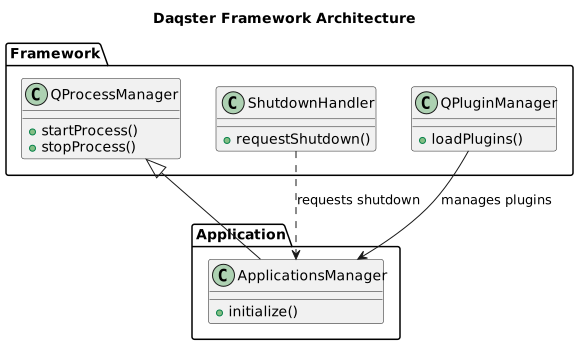
This is the heart of Daqster, responsible for plugin management.
QPluginManager:- Discovers and loads plugins from various directories (build, user, system, environment variables).
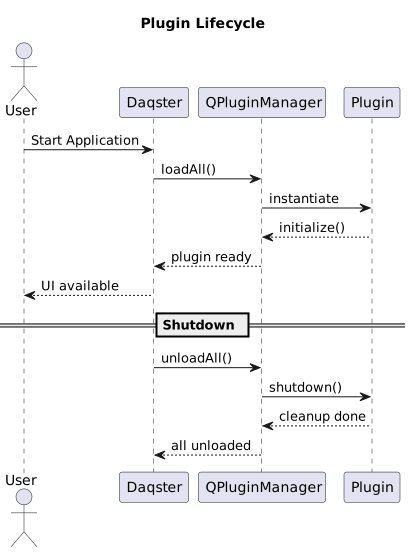
- Manages the lifecycle of plugins (loading, initialization, cleanup).
- Uses hash-based deduplication to ensure each plugin is loaded only once.
- Provides API for the host application to interact with plugins.
QPluginInterface:- Abstract base class that all plugins must implement.
- Defines a standard interface for communication between the host application and plugins.
- Includes methods for initialization, starting, stopping, and accessing plugin metadata.
PluginFilter:- Mechanism for filtering plugins based on their type (
APPLICATION_PLUGIN,DETECT_BY_TYPE_NAME) or other metadata. - Allows the host application to load only specific types of plugins.
- Mechanism for filtering plugins based on their type (
2.2. Host Application (src/apps/Daqster)
The main application that provides user interface and manages plugin launching.
main.cpp:- Application entry point.
- Initializes
QApplicationandQPluginManager. - Handles command-line arguments for direct plugin launching.
- Detects whether the application is running as an AppImage and adapts its behavior.
ApplicationsManager:- Responsible for launching plugins as separate processes (
QProcess). - Properly configures environment variables (
LD_LIBRARY_PATH,QT_PLUGIN_PATH,DAQSTER_PLUGIN_DIR, etc.) for each child process, considering whether it’s running in AppImage or as a regular build. - Ensures that plugins can find their dependencies and resources.
- Responsible for launching plugins as separate processes (
AppToolbar:- Manages GUI elements such as menus and buttons for launching plugins.
- Sends requests to
ApplicationsManagerto launch selected plugins.
2.3. Plugin System (src/plugins)
Examples of plugins that demonstrate the framework’s capabilities.
NodeEditor:- Plugin that provides a graphical interface for creating and editing nodes.
- Uses
nodeeditorexternal library. - Can work as a standalone application.
QtCoinTrader:- Plugin for cryptocurrency trading, using QML for user interface.
- Demonstrates QML and QtCharts integration.
- Can work as a standalone application.
- Test Plugins (e.g.,
plugin_fancy_test,plugin_uggly_test,template_plugin_daqster):- Simple plugins used for testing
QPluginManagerandQPluginInterfacefunctionality. - Show how to implement
QPluginInterface.
- Simple plugins used for testing
2.4. External Libraries (src/external_libs)
External libraries integrated into the project.
nodeeditor:- Library for creating graphical node editors.
- Used by the
NodeEditorplugin.
qtrest_lib:- Library for REST API communication.
- Can be used by plugins that require HTTP requests.
2.5. Tools (tools/)
Directory containing scripts and helper files for build and packaging.
create_appimage.sh:- Universal shell script for creating AppImage.
- Supports
localandcimodes with different configurations. - Automates the process of copying files, setting environment variables, and packaging.
Build_AppImage/:- Directory used for local AppImage builds. Contains temporary files and the final AppImage.
2.6. Docs (docs/)
Directory for documentation.
development/HowToDebugAppImage.md:- Guide for debugging AppImage applications.
development/DeveloperGuide.md:- Contributor workflow and development notes.
operations/BuildHelpers.en.md:- Helper scripts for build and maintenance tasks.
operations/UpstreamManagement.md:- Guide for synchronizing and maintaining upstream dependencies.
porting/QtRest_Qt6_Porting.md:- Notes and decisions related to Qt6 porting of QtRest.
Architecture/README.en.md:- This document.
3. Key Architectural Principles
1. Modularity and Extensibility
- The core is separated from plugins, allowing easy addition of new functionality without changing the main code.
- Plugins are independent and can be developed and tested separately.
2. Dynamic Loading
- Plugins are loaded at runtime, which optimizes application startup time and provides flexibility.
3. Process Isolation
- Each plugin is launched as a separate child process, which increases stability and security. A problem in one plugin does not lead to a crash of the entire application.
4. Cross-platform
- Qt5 for GUI and cross-platform compatibility
- CMake for build system
- AppImage for Linux distribution
Data Flow
1. Application Startup
main.cpp
├── Initialize QApplication
├── Create QPluginManager
├── Load plugins
└── Start GUI
2. Plugin Loading
QPluginManager
├── Scan directories for plugins
├── Load .so files
├── Initialize QPluginInterface
└── Add to active plugins list
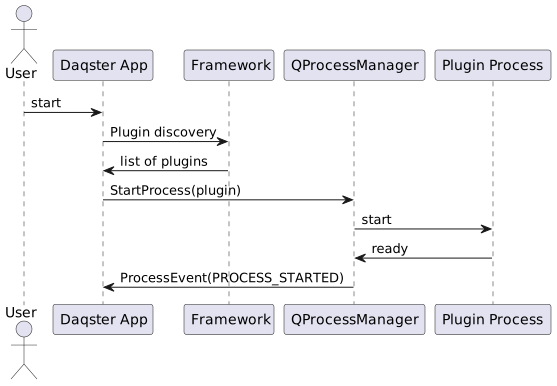
3. Plugin Launch
AppToolbar/ApplicationsManager
├── Receive launch request
├── Find plugin by name
├── Create QProcess with environment
└── Launch as child process
Architecture Diagram
Plugin Discovery Flow
5. Environment Variables
Plugin Discovery
DAQSTER_PLUGIN_DIR: Sets a single directory for searching Daqster plugins.DAQSTER_PLUGIN_PATH: Sets multiple directories for searching Daqster plugins, separated by:.
Qt Environment (in AppImage)
LD_LIBRARY_PATH: Tells the dynamic linker where to look for shared libraries.QML2_IMPORT_PATH: Tells the QML engine where to look for QML modules.QT_PLUGIN_PATH: Tells Qt where to look for its plugins (e.g., image formats, SQL drivers).QT_QPA_PLATFORM_PLUGIN_PATH: Specifies the path to platform integration plugins (e.g.,libqxcb.so).
XDG Directories (for AppImage)
XDG_CONFIG_HOME: Directory for user configuration files (default:~/.config/daqster).XDG_DATA_HOME: Directory for user data (default:~/.local/share/daqster).XDG_CACHE_HOME: Directory for user cache files (default:~/.cache/daqster).
Debug Environment
QT_DEBUG_PLUGINS=1: Enables detailed debug information for Qt plugin loading.QT_LOGGING_RULES="*=true": Enables all Qt debug messages.DAQSTER_DEBUG=1: Enables Daqster-specific debug messages (if implemented).
6. Security Considerations
- Plugin Isolation: Launching plugins as separate processes provides some isolation, but it’s not a complete sandbox environment.
- Code Signing: For production environments, consider signing plugins to verify their authenticity.
- Input Validation: All data coming from plugins or external sources must be validated.
7. Performance Considerations
- Dynamic Loading: Plugins are loaded only when needed, which optimizes startup time.
- Process Overhead: Launching each plugin as a separate process has a small overhead, but provides stability.
- Resource Management: Efficient management of memory and resources in plugins is crucial.
8. Testing Strategy
- Unit Tests: For individual components and plugin logic.
- Integration Tests: For interaction between the host application and plugins.
- AppImage Tests: Automated tests for AppImage startup and functionality.
- Manual Testing: For GUI and user experience.
9. Plugin Lifecycle Diagram
10. AppImage Structure Diagram
Daqster-x86_64.AppImage
|-- AppRun                          <- startup script
|-- daqster.desktop
|-- daqster.png
`-- usr/
    |-- bin/
    |   `-- Daqster                 <- main executable
    |-- lib/
    |   |-- libQt*.so.*             <- Qt libraries
    |   |-- libicu*.so.*            <- ICU libraries
    |   |-- plugins/                <- Qt plugins
    |   |-- qml/                    <- QML modules
    |   `-- daqster/
    |       `-- plugins/            <- Daqster plugins
    `-- share/
        |-- applications/           <- desktop file
        `-- icons/                  <- app icon
11. Future Enhancements
- Plugin Management GUI: Integrated user interface for managing installed plugins (enable/disable, install/uninstall).
- Sandbox Environment: Stricter isolation of plugins (e.g., through Flatpak or Docker).
- Remote Plugin Loading: Ability to load plugins from remote sources.
- Performance Monitoring: Tools for monitoring plugin performance.
- Cross-platform AppImages: Extending AppImage builds for other architectures.